

Uber recently switched how it charges customers for rides in foreign countries from pricing in the country of the ride to pricing in the credit card country of origin. This policy change has the potential to affect many foreign residents here in Mexico.
It means that Uber is now employing a trick known as dynamic currency conversion to extract more money from certain customers. If you’re unfamiliar with how DCC works, check out my previous article on the topic.
Below, I explain how to avoid being overcharged by Uber when taking rides in Mexico using an account that pays with a foreign credit card.
What Uber Changed
Uber recently introduced a “Preferred Currency Pricing” feature that, by default, charges customers in their credit card’s home currency for international rides in certain regions, while adding a 1.5% currency conversion fee on top of their exchange rate margin.
This new feature affects customers with home currencies in U.S. dollars, Canadian dollars, Euros, and British pounds when traveling within the U.S., Canada, the eurozone, the UK, and Mexico. Those who frequently travel between Mexico and the U.S., Mexico and Canada, Mexico and Europe, or Mexico and the UK are at the greatest risk of falling prey to this new practice.
How the Change Affects What Riders Pay
A family member of mine who travels between Mexico, the U.S., and Canada frequently ordered an Uber in Guadalajara this month and was caught off guard when the fare options abruptly switched from pesos to USD.
Before flipping the currency, the mobile app displayed a pop-up that disappeared after a few seconds, whose purpose appeared to be notifying the user that “Preferred Currency Pricing” was in use, i.e., the currency tied to the customer’s credit card was being used instead of the local currency.
This wasn’t a pop-up where the customer is given the choice of whether to use their home or local currency; it was a notification. Below is more detail than what the pop-up contained, as we discovered it’s impossible to re-trigger the pop-up and weren’t fast enough to capture it the first time.
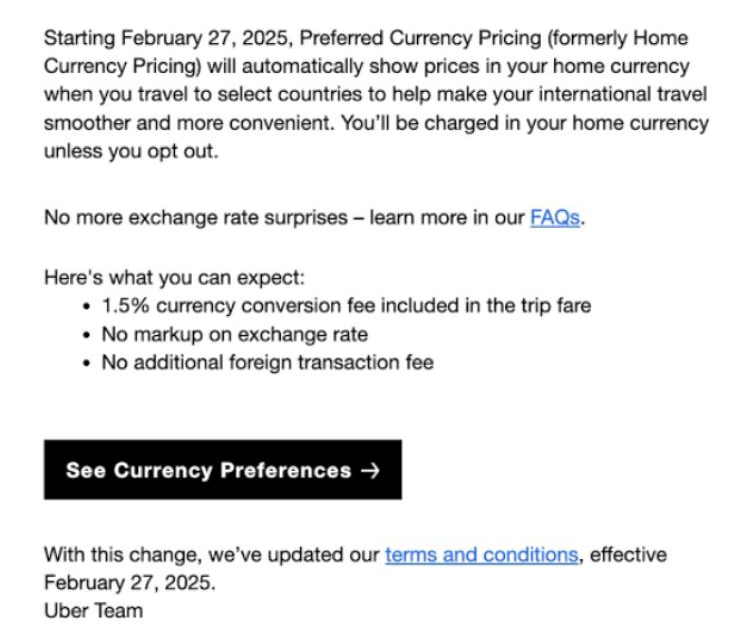
Because the pop-up intentionally displays briefly, many riders probably miss this legally mandated disclosure. Others may not see it if they haven’t been frequent Uber users across borders in recent months.
Under PCP, the customer pays a 1.5% commission to Uber on their currency exchange, and receives Uber’s currency conversion rate, not their bank’s credit card rate. While Uber claims to use the mid-market rate, my testing found Uber’s currency conversion to be far less competitive than what U.S. banks typically charge. (My Capital One card converts charges very close to the spot rate)
In the example below, the same destination at the same time of day in the same class of service carried a 12.5% premium when paying in U.S. dollars using Uber’s new Preferred Currency Pricing, instead of paying in Mexican pesos. Sheesh.
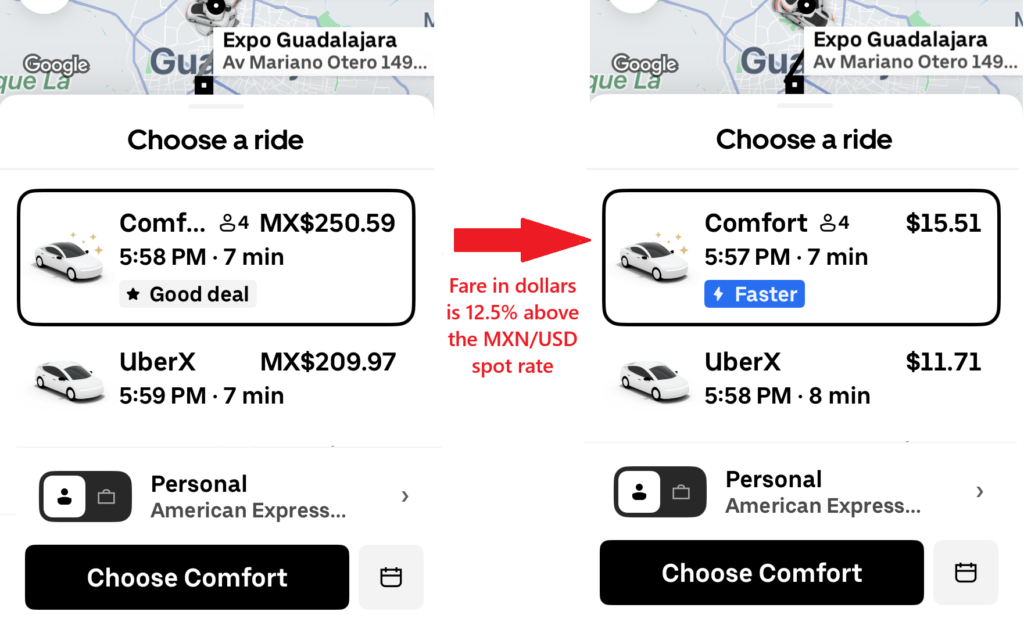
If you have a travel-friendly credit card that applies no foreign transaction fee, your bank or card provider likely offers you a better conversion rate. In this case, using Uber’s default setting costs you a higher commission and an unnecessary fee. On the other hand, if your credit card company has a policy of charging a fixed percentage on foreign transactions (3% is common), then you might prefer Uber’s new PCP policy.
Since most expats are savvy enough to use credit cards with no foreign transaction fee, this probably won’t affect many legal foreign residents. Tourists, on the other hand, should do their own due diligence to decide which option is better.
If you want to ensure that you always pay for your Uber rides in local currency, follow the steps outlined below.
How to Avoid Overpaying for Uber Rides in Mexico
By default, the Uber app automatically sets your home currency as the preferred currency for eligible international trips, i.e., PCP.
One way to avoid this mess is to get a Mexican credit card and add it to your Uber account as your preferred payment method. But getting credit in Mexico as a foreign resident isn’t so easy if you’re new to living abroad.
If interested, check out my previous article on getting a credit card in Mexico as a foreigner.
The far simpler route is to make changes to your default settings in Uber to opt out of this practice. To allow your credit card company to handle the conversion, make the following changes:
- Open the Uber app and tap the Account button.
- Navigate to your Uber Wallet.
- Scroll down to Preferred Currency and select “Always Pay in Local Currency.”
- Hit “Confirm” to save the changes.
If you did these steps correctly, you should see this notification at the top of your screen:
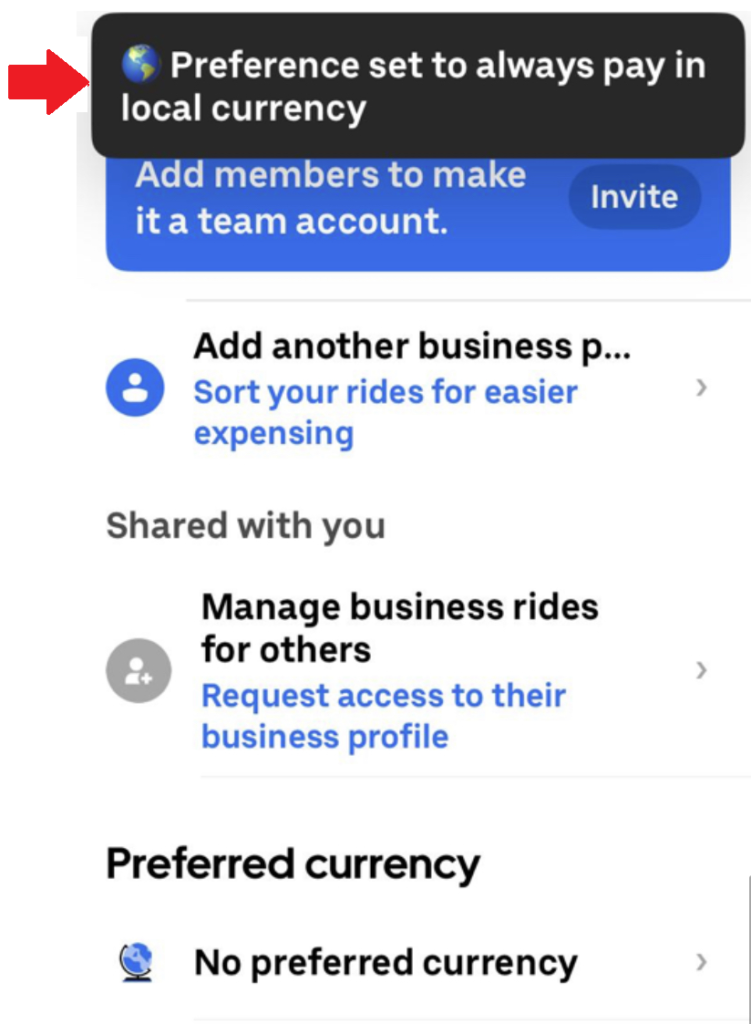
NOTE: If your Uber account contains both personal and business profiles, you must make these settings changes in both to avoid being defaulted to the card’s home currency instead of the local currency.
For those who want to be extra careful, verify that your Uber wallet displays “No preferred currency” before requesting your next ride, because once the trip is confirmed, you cannot change the currency used for payments.